 Learning
 Credentialing
 Compliance

Effectively using healthcare incident reports turns your organization from reactive to proactive and can reduce the total number of harmful incidents. But, to realize the benefit, you have to encourage the reporting of incidents and harness data that can be hard to come by.
The real proactivity comes when you can identify incident trends before they become a serious problem. For example, if you know that one department is more prone to falls, you can conduct more frequent safety sweeps or offer incentives for months without lost time.
Using paper and spreadsheets to identify these trends is nearly impossible. It’s one of the biggest values of an online incident reporting system. MedTrainer a leading healthcare-specific incident reporting software that offers reporting and analytics capabilities to help you identify and act on trends.
Monitor Incident Trends in Real Time
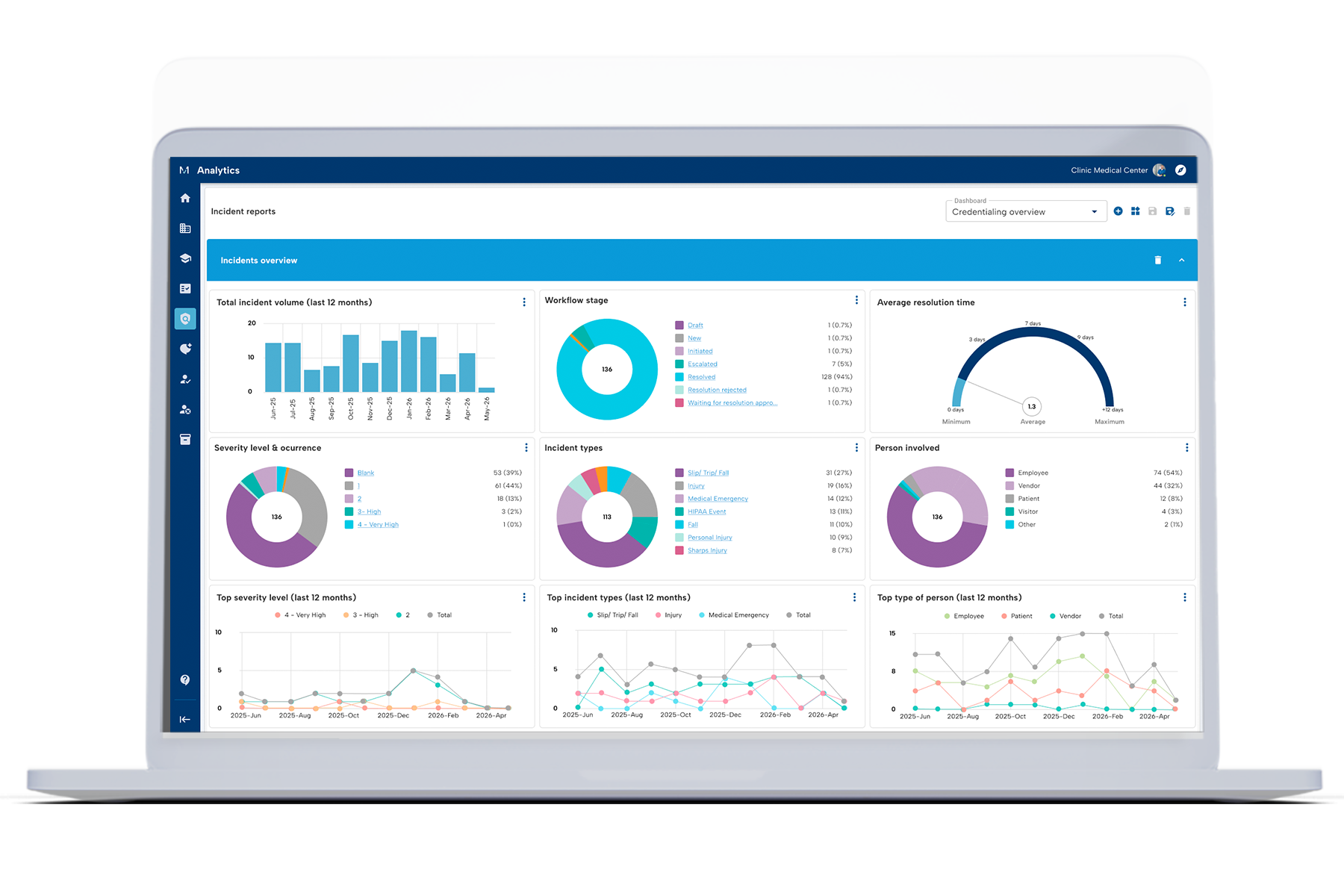
MedTrainer clients have been asking for a faster way to stay on top of incident activity, without pulling a report every time. That’s exactly what the Incident Reporting Analytics dashboard delivers.
Admins and super admins can open it right from the Incident Reporting module and get an immediate, visual snapshot of what’s happening across their organization.
The dashboard surfaces nine widgets out of the box, including:
- Incident volume
- Top Severity Level & Occurrence (last 12 months)
- Top Incident Types (last 12 months)
- Workflow stage
- Average resolution time
- Top Person Involved Profile (last 12 months)
You can filter by department, division, or location to quickly spot where attention is needed. In fact, if you currently pull incident trends into spreadsheets to prepare for quarterly quality improvement (QI) meetings, the dashboard does that work for you.
Beyond monitoring trends, you can click any data point on the dashboard to see the incidents behind it in the workflow table. For example, if you notice a spike in falls, you can drill down to see where those incidents are happening. From there, you can investigate why it may be occurring and whether it points to a need for additional training or a policy/procedure review.
The dashboard can also help you spot bottlenecks. If resolution time for an incident is running high, you can investigate why. Or if an incident is stuck at a particular workflow stage, you can flag it and address it.
Having both means you can quickly figure out what’s happening and why, without leaving the platform.
Easily Report on Incident Trends
Customizable reporting in MedTrainer’s all-in-one compliance platform offers healthcare organizations the ability to analyze incident report data from multiple angles to improve safety and patient care.
Build reports with any standard fields including incident number, lifecycle (active, inactive), status (resolved, escalated, etc.), location, date, names of people involved, escalation process, and more. You can filter this data to get exactly what you need, then save the report or email it on a recurring schedule.
Report Ideas
- Resolved incidents by month and location to share with your board or auditors.
- Escalated incidents by elapsed time and escalation process to see where resolution is being delayed.
- Incidents by type, department, and location to identify trends and conduct an investigation.
The filtering ability also makes it easy to find specific incidents and check the incident activity log to see every action taken. This is especially helpful for super admins who are managing other locations and want to be sure the incident is resolved correctly.
Increase Proactivity in Your Organization
An online incident reporting system like MedTrainer simplifies the reporting process for employees, which helps to build a culture of compliance and proactivity.
With one system for compliance training, policy acknowledgement, and incident reporting, employees have less login information to remember and can quickly report an incident right after it happens. By creating incident report templates for each type of incident, you can ensure the fields are relevant and don’t leave employees guessing the information to complete. Plus, completed incident reports are available in the employee dashboards so they can watch the progress and see resolution of their reports.
Every report template can include an anonymous reporting option to give employees more peace of mind.
Why Choose MedTrainer for Incident Reporting Software
MedTrainer is built for healthcare organizations and their unique challenges. Incident types can vary based on geography, patient population, and more, so the ability to create an unlimited number of templates is critical. These templates also make analyzing data even easier to bring attention to what needs to be investigated.
Whether you’re a federally qualified health center (FQHC) with a risk committee or an accredited urgent care facility, MedTrainer Incident Reporting can help you create a culture of proactivity and safety.