 Learning
 Credentialing
 Compliance

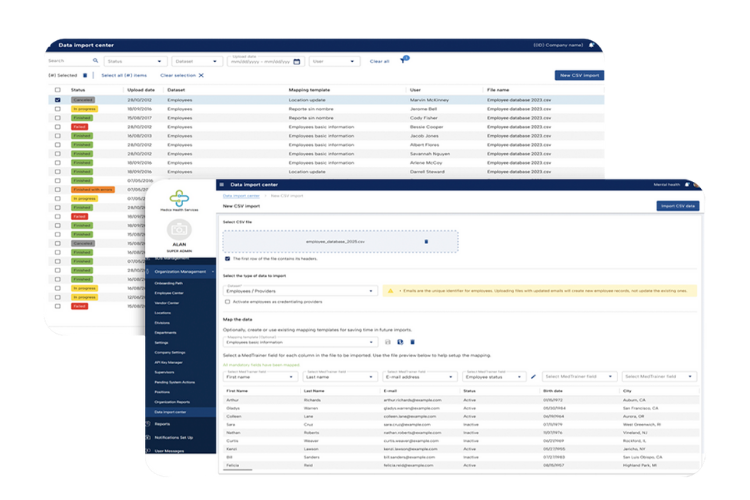
Your busy healthcare organization won’t skip a beat when you select MedTrainer’s platform for your credentialing, compliance, and learning needs. MedTrainer’s Data Import Center allows teams to quickly add, update, or remove large groups of providers in just minutes. Using a simple CSV upload with no special formatting, teams can bulk upload provider information without the need for manual, profile-by-profile data entry, to update entire departments, onboard new providers, or manage workforce changes at scale.
With the dreaded data import done, you can immediately start assigning training, collecting credentialing documents, and relying on MedTrainer’s dashboards for visibility. You’re no longer losing valuable time to repetitive data entry during busy periods like the summer credentialing surge. With one quick upload, you can be confident that your workforce is supported from the very start.
With the Data Import Center, HRIS integrations, bulk provider document upload, and more, it’s no surprise that MedTrainer customers start using the platform a month and a half sooner, according to G2.
Schedule a demo to see MedTrainer in action.
A Simpler Way to Upload Provider and Employee Information
The faster you can add employees to the platform, the faster you can close compliance gaps and fix costly credentialing delays. The Data Import Center makes it possible for healthcare organizations to maintain momentum and improve processes that enable growth.
Upload Any CSV File
Upload a CSV file from any source — an HRIS export, a legacy system, or a spreadsheet your team maintains internally. There is no required template or special formatting. Simply choose whether the file contains employee or provider data and begin the upload.
Map Fields With Flexibility
Match columns from your file to MedTrainer’s standard fields and save your mapping to make the process even faster the next time. When uploaded values don’t perfectly align with MedTrainer’s standardized options, the Data Import Center intelligently maps unmatched legacy values to “Other” while preserving the original text for reference.
The following fields sync from the Data Import Center: name, email, address, position, location, department, date of hire, deactivated date, supervisor, internal ID, social security number, NPI (national provider identifier), employee status, and CAQH information.
Track Upload Status in Real Time
As the file processes, the system automatically validates your data. It flags any missing fields or duplicates and provides clear statuses such as in progress, finished, finished with errors, or failed. This makes it easy to see exactly what was updated and where corrections may be needed.
Intelligent Validation Keeps Things Moving
Traditional data imports often fail when a single error appears, bringing the entire process to a halt. MedTrainer’s Data Import Center features intelligent validation to prevent non-standard or invalid values from stalling progress.
As files are uploaded, the system automatically validates incoming data and identifies missing fields, duplications, or invalid values. Instead of stopping the entire upload due to an isolated issue—such as a non-standard country entry—the Data Import Center processes all valid data and skips only the individual discrepancies. This allows teams to move forward without disruption while still maintaining data integrity.
Easily Update and Manage Staff Records
Once records are validated, updates are applied immediately across MedTrainer. Employees are added to the Employee Center so they can complete training, submit incident reports, view policies, and more. Provider profiles are automatically created to start the credentialing process. Bulk updates save time and email matching prevents duplicate records across multiple facilities.
For further tracking, dashboards provide real-time visibility into every upload, clearly displaying statuses such as:
- In progress
- Finished
- Finished with errors
- Failed
Together, these capabilities make it easier to manage your workforce at scale and provide real-time accuracy and transparency across your organization.
Make New Hire Onboarding Easier to Manage
Turn new hire onboarding into a fully-automated process starting with a CSV upload into the Data Import Center. When an employee is added to MedTrainer, an onboarding workflow is automatically triggered based on their role, department, and location. From day one, each employee receives the training, HR forms, and policies tied to their role, giving them a faster start while reducing the manual setup work for administrators.
- Faster onboarding gives new hires a smoother transition into their roles and reduces the time before they can complete all parts of their role.
- Automated assignments increase accuracy when you’re not depending on a human to assign each compliance course and policy for every role in the facility.
- Reliable dashboards and reports confirm staff are current with training and acknowledgments, providing clear evidence of compliance whenever it is needed.
The result is an onboarding process that feels seamless and dependable. Training begins right away, data stays consistent over time, and organizations can trust that compliance will remain on track as their teams grow and evolve.
See how you can automate new hire onboarding.
Make Provider Onboarding Faster and More Accurate
Credentialing relies on accurate provider data from the very beginning. When information is complete and accessible, credentialers can start workflows without delay and keep onboarding on schedule. Uploads through the Data Import Center automatically create or update provider profiles, the source of truth for all credentialing and enrollment information for that provider.
- CAQH information included in the uploaded CSV file gives credentialers a head start on populating provider data from a direct integration with the industry’s most trusted source.
- Accurate data across the platform limits potential enrollment or license issues that stem from typos or incorrect details.
- Essential credentialing data captured such as SSN, NPI, and CAQH, give credentialing teams the foundation they need to begin the credentialing process.
Credentialing takes long enough without waiting for manual uploads of provider data. Eliminate excuses with nearly instant profile creation using MedTrainer’s Data Import Center. The impact is a credentialing process that runs smoothly, handles large volumes with ease, and supports specialists with dependable information every time.
Get Started Faster With MedTrainer
New MedTrainer customers start using the platform 73% faster than the industry average and user adoption is 90%, according to G2. With features like the Data Import Center, healthcare organizations can start improving compliance and credentialing immediately, without spending valuable time on manual data entry and software set-up.
MedTrainer’s HRIS integrations are another option to get started quickly. Employee data is automatically synced daily and when new employees are added, automated onboarding paths start immediately.
From bulk uploads of employee and provider data to automated assignments and CAQH integration, every step is designed to reduce manual work and give teams confidence that nothing will be missed. By replacing scattered tools and manual processes with a single platform, MedTrainer removes barriers that slow organizations down and ensures staff are supported from day one.
See for yourself how MedTrainer brings it all together to simplify compliance and credentialing. Schedule a demo to learn more.