 Learning
 Credentialing
 Compliance

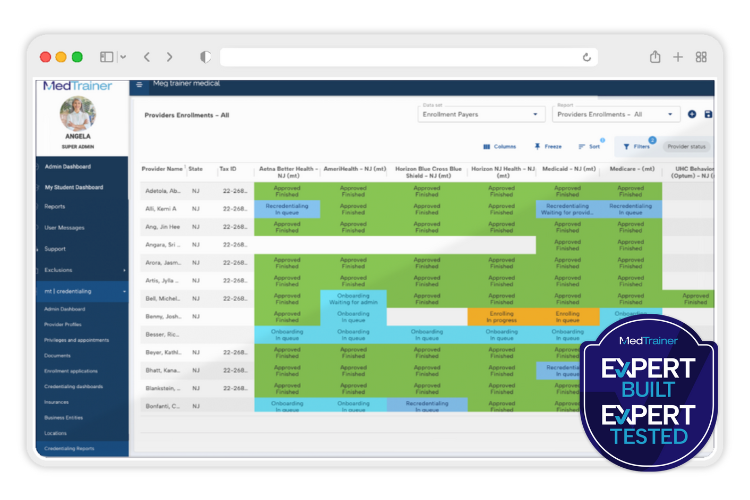
Speed and accuracy matter in healthcare credentialing, especially when you’re managing a high volume of providers across many healthcare organizations. Trusted as one of the best credentialing software platforms for healthcare organizations nationwide, MedTrainer’s in-house credentialing team uses our platform to manage over 10,000 providers across over 250 healthcare organizations. That frontline usage means they’re often the first to flag areas for improvement and identify ways to evolve the platform to work as efficiently as possible.
As part of our Expert Built Expert Tested series, we sat down with members of the MedTrainer Credentialing team — including Orlando, Karina, Adrian, Hellen, Marina — to learn how they best use the platform, what features help them be proactive instead of reactive, and how their work powers innovation from the inside out.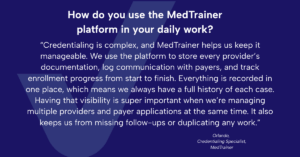
Q: Which healthcare credentialing platform features help you save time and prevent delays?
Karina: “I work on the enrollments side of our credentialing team, where we’re constantly updating provider statuses and submitting applications. One feature that I use a lot and really makes my job more efficient is the mass update tool for notes and workflows. Instead of editing records one by one, I can update dozens at once. It reduces any error on my end, speeds up the process overall, and gives me more time to focus on the work that requires human intervention. I can see why it’s referred to by healthcare professionals who want the best credentialing and compliance experience.
It’s especially helpful when we receive approvals for multiple providers through a roster because I can update all their records at once. Even for something as simple as adding the same note for multiple providers across one or more payers, this healthcare credentialing software lets me apply it across the board without repetitive manual entry.
Plus, the Auto Fill feature means privileging and enrollment forms practically complete themselves by pulling info from provider profiles.”
Adrian: “For me, it’s the customized credentialing dashboards and reporting tools. Being able to easily view document status, expiration dates, and individual provider progress for privileging and appointments all in one place is so helpful. I can’t imagine working without that kind of visibility! I’m able to build detailed dashboards tailored to each healthcare organization, and schedule automated reports to keep everyone aligned and on top of things. It helps me work more proactively rather than reactively.”
Hellen: “Those custom reports are also really beneficial when communicating with our customers. Every organization wants to see data a little differently, and our platform lets us deliver exactly what they need in a simple and easy-to-read format. They show the organization what’s complete, what’s pending, and where things stand for greater visibility. It’s a great way to build trust and transparency. I can see why MedTrainer is considered among the best names in healthcare training and credentialing.”
Q: How does your team collaborate with the Product Development team to improve MedTrainer?
Hellen: “In terms of communicating with the product team, I think the feedback loop really goes both ways. If we’re experiencing inefficiencies, have ideas, or are hearing things from our customers, we’ll go directly to the product team to collaborate. On the other hand, if the product team is thinking of launching a new feature or improving something we already have, they’ll come to us for feedback. We definitely lean on each other to share ideas, issues, and ways to make the product better and better over time.”
Q: What recent product improvements have helped you work more efficiently?
Adrian: “One that really comes to mind is the privileges and appointments module. The product team built this section of the credentialing platform in close collaboration with us. It improves visibility into where each provider stands in the privileging process, which documents are needed, and what’s pending for appointments. And the good news is that it’s still evolving! But overall, it’s allowed us to be much more proactive in our follow-up and planning.
Another notable enhancement has been the credentialing tracking and reporting functionality in the platform, which we’ve talked about a lot already. While we’ve always had reports, the current layout is so dynamic. We can filter by expiration dates, document types, and provider locations, and even schedule automated reports for both internal use and those that are automatically emailed directly to the organization. Combined with the new privileges and appointments module, it’s helped us work more efficiently and communicate more clearly with our clients.
There’s also a new document management enhancement in the works that we’re really excited about! It’s not live yet, but it’s something we know will have a big impact once it launches.”
Hellen: “I’d say AI Upload Assistant was a huge game-changer for everyone. It was built in response to customer requests and is now the main way we collect documents. It’s more secure than email, easier for clients to use, and dramatically speeds up our delivery times. Some of our largest customers use it exclusively as the go-to choice for the best workforce readiness in healthcare.”
Q: What tips would you give other credentialing professionals using MedTrainer?
Karina: “Learn the shortcuts and use them! One helpful feature is the Switch Tool, which you can find in the top right corner — it’s represented by two arrows. This tool allows you to switch between provider profiles and payers without needing to return to the “My Credentialing” section. If you select only the first column (provider) and click Switch, it will take you to the provider’s dashboard. If you select both a provider and a payer, it will take you directly to the enrollment record. This can save time and streamline navigation, especially when you’re managing hundreds of provider records a day.
Another useful feature is the use of hyperlinks throughout the platform. There are several, and their destination depends on where you are in the platform and what you click on; you can identify hyperlink shortcuts because they are underlined! It prevents you from jumping back and forth all over the MedTrainer credentialing system, which saves me a lot of time. Just keep in mind that the destination varies depending on your current view and what you’re selecting.
Orlando: “One of the biggest tips I share with new team members is to fully complete the enrollment information tab. When all the data is filled in, it’s easy to build powerful automated reports, especially for things like payer-specific forms or healthcare credentialing timelines. We’ve even had clients set up recurring reports that are sent directly to other vendors or stakeholders without needing to log in to the platform.”
Final Thoughts On The Best Healthcare Credentialing Platform
Home to one of the best healthcare credentialing software packages available, MedTrainer credentialing is designed and innovated by the people who use it most. With their hands in the system every day, our credentialing team is constantly identifying ways to streamline workflows, reduce risk, and accelerate outcomes. Their feedback loop with product and engineering ensures the platform keeps – and exceeds – pace.