 Learning
 Credentialing
 Compliance


Provider onboarding only moves as fast as document collection. For many credentialing teams, gathering, sorting, and uploading provider documents turns into a head-swirling cycle of emails, reminders, mismatched file names, and duplicate uploads. It’s an administrative burden that pulls specialists away from higher-value credentialing work, delays revenue, and limits access to patient care.
Even our own credentialing team has experienced this pain as they manage documentation for thousands of providers across hundreds of organizations every day. It was the firsthand experience of our credentialing specialists that directly shaped several MedTrainer features that reduce this pain and help other teams get providers onboarded faster.
With healthcare credentialing software like MedTrainer, collecting provider documents is easier than ever so you can onboard new providers faster, effectively manage mergers or acquisitions, and even make a transition to new software easier.
Streamline Provider Document Collection
1. Electronic Provider Document Requests
Chasing missing documents is often the most frustrating part of credentialing. Providers may not know what you’re asking for, emails get buried, outdated files get re-sent, or uploads come through without context. A single missing item can stall onboarding for weeks, and credentialing teams end up spending more time following up than credentialing.
MedTrainer digitizes and automates the document collection process so you quickly get exactly what you need without all the back-and-forth.
- Send providers a secure digital request (no login required)
- Set the required documents by provider type, speciality, location, and more
- Providers upload documents in bulk through a secure portal
- Providers receive automatic reminders until all required documents are submitted
- You can accept or reject uploads individually with comments for corrections
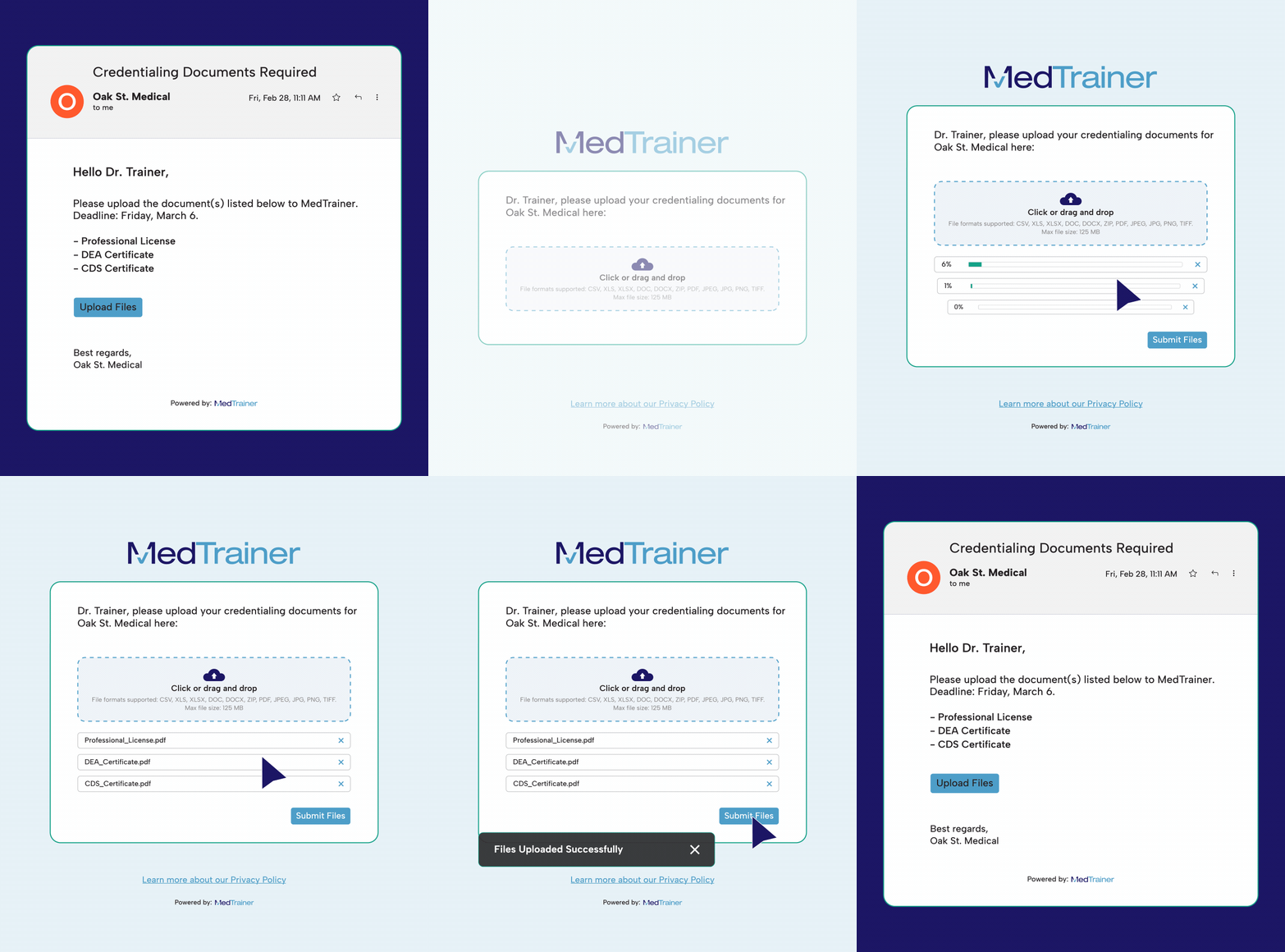
Every document submission routes directly to the correct provider profile with full visibility and accountability. This eliminates unclear email threads and keeps every request tied to a provider profile with an at-a-glance view of document status, expiration date, and more.
2. Mandatory Documents Template
Tracking unique document requirements based different locations or specialties can quickly become unmanageable and prompts unnecessary rework. With Mandatory Document Templates, credentialing specialists can define exactly which documents are required by provider type, state, and location. This enhancement gives teams the precision they need, especially those managing multi-state or multi-site operations where documentation requirements vary and “one-size-fits-all” templates create unnecessary cleanup work.
With this feature, credentialing teams can:
- Assign mandatory documents by provider type, state, and location all from one place
- Avoid document clutter by assigning documents only to the providers who actually need them
- Maintain accuracy across diverse provider groups without repetitive manual edits
- Standardize documentation rules across facilities, even when state-specific variations apply
- Rely on the system to match providers to the right requirements by automatically recognizing when a provider’s location state matches the template’s defined rules
No more deleting irrelevant documents from profiles or manually building separate checklists for each site. The system does the organizing for you. Credentialing teams get a smarter, cleaner, more scalable way to manage documentation.
3. Bulk Document Upload With AI Assistance
Credentialing specialists often spend hours just trying to get documents into the system before credentialing can even begin. Files arrive scattered across inboxes, mislabeled (“LicenseFinal2.pdf” or “scan00023.jpg”), or missing expiration dates. Teams have to manually review every file, determine the document type, re-name it, assign it to the right provider, and key in data by hand. It’s repetitive, error-prone, and slows the entire onboarding process.
MedTrainer’s AI Upload Assistant removes all of that busywork.
Users can upload provider documents in bulk using one drag-and-drop action. The AI Upload Assistant then:
- Identifies which provider each document belongs to
- Classifies the document type (e.g., license, insurance, DEA validation)
- Accurately extracts and applies expiration dates automatically
- Places the file in the correct folder within the provider’s digital profile
- Adds the document expiration date to MedTrainer’s reminder and reporting workflows

What used to take hours now takes seconds. The result is faster onboarding, fewer manual errors, and immediate visibility into what’s ready and what still needs attention.
3. Document Status Tracking By Provider
For many credentialing teams, half the struggle is simply knowing what you have, what you still need, and where everything stands. When documents live in email threads, shared drives, and personal folders, it’s almost impossible to get a clean picture of what’s complete (and what’s holding up the process.) This lack of visibility creates unnecessary delays and rework.
MedTrainer turns each provider profile into a clear, centralized source of truth. Every profile captures:
- All provider data and documents in one place
- Expiration dates (automatically extracted for many document types)
- Version history for every file
- Missing or outdated items clearly flagged
Instead of guessing or hunting for information, you have instant, at-a-glance visibility into document status and collection progress. You know exactly what’s done, what’s outstanding, and what needs attention so the credentialing process keeps moving without unnecessary delays.
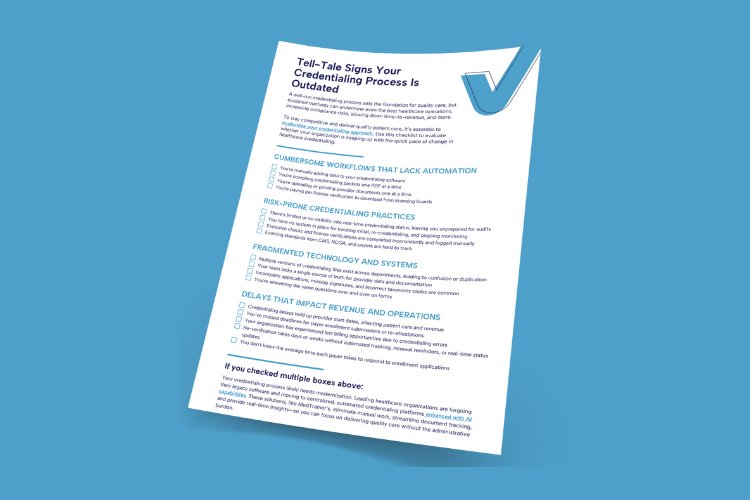
Find out if your outdated credentialing process is costing you.
Document Collection, Simplified
Each of MedTrainer’s features tackles a different point of friction within document collection, and together, they fundamentally change the pace of credentialing.
With MedTrainer, teams gain:
- Greater efficiency
- Higher accuracy
- Faster onboarding and enrollment
- More complete provider information
- Fewer delays caused by missing or incorrect files
For credentialing teams already stretched thin, the difference is immediate. Tasks that once required hours of sorting, reviewing, and data entry now happen almost instantly, allowing teams to focus on what matters most: getting providers credentialed and enrolled faster.
Everything You Need After Document Collection
Once documents are collected, MedTrainer continues to streamline the rest of the credentialing process with built-in tools that eliminate extra steps and keep everything moving. From packet creation to form completion and ongoing verification, everything stays organized and up to date without extra manual work. Some key features include:
- Auto-generated credentialing packets: Instantly compiles all required documents into a complete, ready-to-send packet.
- AI Form Mapping: Automatically recognizes and maps form fields so setup and data entry take seconds instead of hours.
- Auto-Fill and Auto-Extract: Pulls data from the provider profile to complete forms and extracts information from uploaded PDFs to keep profiles accurate.
- Automated Exclusion Monitoring: Checks federal and state databases and alerts teams to any status changes.
- Direct CAQH Integration: Adds provider data directly from CAQH, reducing errors and keeping profiles current for enrollments and recredentialing.
See What This Could Look Like for Your Team
Document collection shouldn’t be the bottleneck in your credentialing workflow. With AI-powered uploads, streamlined provider requests, and centralized provider data management that shows exactly what’s done and what’s outstanding, MedTrainer gives teams the clarity and speed they need to move credentialing forward without friction.
Want to see these features in action? A MedTrainer expert can walk you through how these tools fit directly into your existing workflow. Schedule a demo to learn more.