 Learning
 Credentialing
 Compliance


Key Takeaways
- MedTrainer adapts to your existing credentialing workflow instead of forcing a complete rebuild.
- MedTrainer clients credential each provider an average of three weeks faster than their previous process.
- MedTrainer customers report cutting enrollment time by up to 60%.
Choosing credentialing software is one of those decisions that feels bigger the longer you sit with it. You’re choosing the operational backbone for how providers get to work and how the organization gets paid. The urgency is real, but so is the fear of moving too fast.
It’s natural to have questions. And to want reassurance that you’re thinking about the right things.
I’ve compiled the questions that (nearly) every healthcare credentialing professional asks before selecting a vendor. You’ve already done the hard part. You’ve narrowed the field, sat through demos, now you just need clear answers to the few questions still standing between you and a decision. You need to know exactly what you’ll be getting into if you choose MedTrainer.
Here are our honest answers to your toughest questions.
I want the system to work the way I work. How flexible is MedTrainer for our specific processes?
MedTrainer is built to support your existing credentialing workflow, not replace it with a new one. The goal is to give your current process a better home: one that’s organized, trackable, and shareable across your team. You should be able to complete all configurations on your own, without needing IT assistance.
Here’s an article with all customizations available within MedTrainer’s credentialing platform.
There are hundreds of ways to make the healthcare credentialing software work for you. The teams that get the most out of it are the ones who take the time in implementation to map their process into the system, with guidance from their implementation specialist. That said, MedTrainer is a structured platform with defined capabilities, not a fully custom build. The goal is fit, not a complete rebuild.
What exactly does MedTrainer do? Which parts of my process does it support?
MedTrainer covers the full credentialing lifecycle with customizable workflows that move through defined stages.
Primary source verification: Verify licenses, certifications, education, and work history directly against primary sources, with documentation captured and time-stamped in each provider’s profile.
Exclusions monitoring: Run ongoing checks against OIG, SAM, and state exclusion lists so you catch issues before they become compliance problems, with automated re-screening on a recurring schedule.
Provider document management: Store, organize, and track every provider document in one place, with automated reminders that flag expiring licenses and credentials before deadlines hit.
Privileging and appointments: Build and manage privileging packets and appointment/reappointment workflows across multiple locations, all within the same platform.
Provider enrollment: Manage payer enrollments end to end, with CAQH integration that auto-fills forms using verified data and tracks each enrollment through to completion.
How can we implement new credentialing software without disrupting our day-to-day operations?
The most successful organizations take a phased approach — continuing their existing credentialing work while gradually transitioning providers, documents, and workflows into MedTrainer.
Our implementation specialists work alongside your team to create a customized onboarding plan based on your organization’s size, goals, and current processes. We help configure your system, migrate key data, establish workflows, and provide role-based training so your staff can learn the platform without feeling overwhelmed.
Rather than expecting your team to figure everything out on their own, our goal is to make implementation manageable by breaking it into clear, achievable milestones. This allows your organization to continue supporting providers while building a more efficient, compliant credentialing process for the future.
With the right implementation strategy and ongoing support, many organizations find that they begin saving time and reducing administrative burden shortly after going live.
What will I have to do to get MedTrainer set up for my organization?
In full transparency, it takes some legwork to get any new system set up how you want it and all of your information added. However we’re confident that time will be returned to you within the first three to six months of using MedTrainer.
You should plan to spend about eight hours in training: four hours will be group training and the other four are usually one-on-one with a client success expert (there’s no limit on training time!). Our team makes sure you know how the platform works, what can be customized, and how to do it. After training, you’ll configure your organization’s locations, activate and set up providers, upload all provider documents, manage form mapping, add payers and set up provider enrollments, set up verifications and exclusions, set up privileges, and build reports.
How do we get our existing provider data into the platform?
Getting existing provider data and documents into a new credentialing platform is often the most time consuming part of implementation. It is your responsibility to get everything into the platform, unless you’re using our fully-managed services. Here are some of the provider document management tools included in MedTrainer’s credentialing platform to help you get set up more quickly:
- Data Import Center: Upload select provider information via CSV (no rigid template needed!)
- CAQH integration: Data automatically imports from CAQH via a secure API connection (there are a few data points not included)
- HRIS integration: Select data automatically imports via a public API or directly from many leading HRIS platforms
- File Staging Area: Upload provider documents in bulk with AI-powered classification (up to 500 documents at a time)
- Electronic document request: Best for new providers, you can electronically request documents one provider at a time
How does MedTrainer handle multi-location and multi-specialty organizations? Will the setup actually reflect how my organization is structured?
MedTrainer is built to handle this multi-site credentialing complexity. You can model workflows for the way your organization is actually structured — entities, locations, divisions, and specialties — within the single platform, so you’re not forced into a fixed template. Whether you’re a multi-site medical group, a hospital, or a multi-specialty practice, the platform is designed to reflect how your organization actually operates.
Here’s what that looks like in practice:
- Configure provider profiles to your structure. Set up profile fields to capture location-based privileges, specialty-specific requirements, and enrollment details, so each provider record reflects where and how they practice.
- Role-based access and permissions. Align user roles and permissions with your org structure so the right people see the right data — and role-based dashboards keep each stakeholder focused on their providers, while leadership keeps visibility across the organization.
- Privileging across every facility. MedTrainer centralizes privileges for all providers across all locations in a single, filterable view of what each provider is approved to do and where — so you can build packets by site and compare privileges across locations at a glance.
- Report and build dashboards by location, specialty, or organization-wide. Filter and group providers by site, department, or specialty, and pull data into custom reports and dashboards for a single location, a division, or the whole organization — then schedule send them to the right leaders automatically.
Taking time at the start to configure this structure correctly pays off significantly, because everything downstream in credentialing management flows from how your organization is set up. Your implementation specialist will help you map it correctly from day one.
Is credentialing software really going to save time?
That’s a fair question. MedTrainer clients say they credential each provider an average of three weeks faster than their previous process. We like to say our software makes it easier to get things done, and harder to make a mistake. You’ll spend less time on tasks that shouldn’t require your expertise, returning your time to focus on what matters most.
Managing the details in credentialing is what eats up time: document types, varying deadlines, payer requirements, provider data. When that lives in disconnected systems, things fall through the cracks and slow everything down. MedTrainer addresses this with specific tools: AI document classification handles bulk uploads and auto-places files into the right profiles. Auto-extract pulls data from uploaded documents directly into provider records with no manual entry. CAQH integration auto-fills enrollment forms with verified data. Automated reminders flag expiring licenses before they become a problem. The result is that MedTrainer customers report cutting enrollment time by up to 60% — not by changing their process, but by removing the repetitive, time-consuming work from it.
Some examples:
- A standard document collection, reminders, and verifications process that used to take 21 days, MedTrainer completed in 7 days.
- CAQH data entry that took an entire day, MedTrainer completed in 2 minutes with the help of our secure API integration.
- Completing an enrollment application that typically required 3 days, MedTrainer completed in 3 hours (and, with greater accuracy than if done manually).
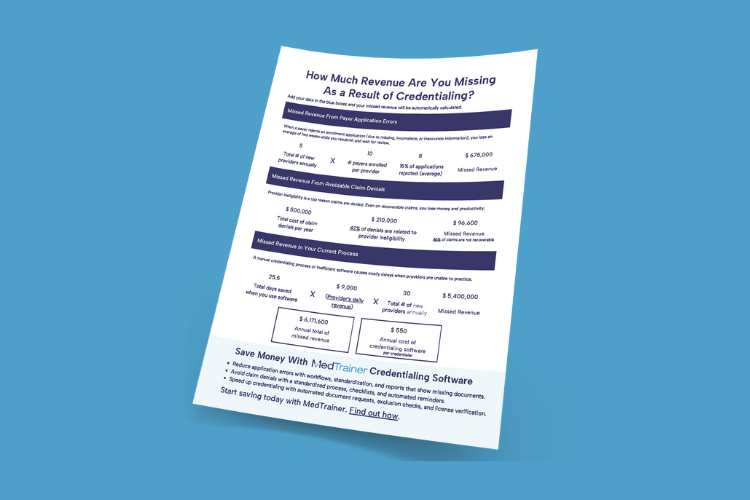
Find out how much revenue your provider credentialing process is losing.
How can I be sure I’m setting up my credentialing platform the right way?
We’ll be there to guide you every step of the way! In addition to an implementation team and client success team, we also have a credentialing specialist dedicated to helping clients make the most of their platform.
In general, we recommend starting with your organization structure: entities, locations, divisions, and specialties. That foundation shapes everything else. You’ll activate the CAQH integration early to auto-populate provider profiles and save significant time on every enrollment you run from that point forward.
Once your structure and provider information is in place, the focus is on getting one core workflow (typically payer enrollment or provider onboarding) fully configured and running before expanding. The teams that ramp up most successfully don’t try to use every feature at once. They get one process working well in MedTrainer, build confidence with the platform, and grow from there. Your implementation specialist is there to guide this. Lean on them!
Does MedTrainer send applications to payers or communicate with hospitals on my behalf?
It depends. MedTrainer offers provider credentialing software as well as fully-managed credentialing services. The software is a tool to manage the credentialing process on your own, or within your organization. When you add fully-managed credentialing services, our credentialing specialists handle every aspect of your credentialing within the software.
The software simplifies the enrollment and privileging processes, but the actual submission still goes through you.
Our fully-managed credentialing service handles the entire process on your behalf, including application submission, TIN linkage, and follow-through to decision. Our team can help you determine which approach best suits your organization’s needs.
Can I communicate through MedTrainer — with providers, payers, or colleagues?
MedTrainer gives your team a shared workspace for all credentialing activity, which significantly reduces the back-and-forth that typically lives in email chains. Internal collaboration and task tracking are built in, so team members can see what’s assigned, what’s pending, and what’s been completed without having to ask.
For external communication with payers or hospitals, you’ll continue using your existing channels, but MedTrainer helps you document and track those touchpoints so nothing gets lost between people or inboxes.
Ready for the next step? See what your first stretch with the platform looks like in Getting Immediate Value From Credentialing Software.